
AI access: site MCP server and API reference
Updated: 2026-10-11 · YaDominios
Every YaDominios Cloud site has "AI access": the owner creates a key (read-only, or read and write) from the site card, and any AI uses it to run that site without the dashboard. There are two doors with the same seventeen tools: an MCP server at https://yapanel.yadominios.com/api/sitio/mcp, which connects from Claude Code, Cursor, or OpenAI Codex, and an HTTP API at https://yapanel.yadominios.com/api/sitio/v1/<tool>. With them the AI reads status and the live version, the log and email, changes variables, republishes, manages files and the database, creates test sites, and searches, prepares the purchase of, and connects domains. The AI never pays: to buy a domain it returns a payment link for the owner. The key opens one site, is shown once, never expires, and is revoked in one click.
Who this is for: any AI —Claude Code, Cursor, OpenAI Codex, or your own agent— working ALONE in a customer's session that needs to run their YaDominios Cloud site with nobody around to explain. Everything it needs is on this page.
At a glance
| Item | Value |
|---|---|
| MCP server | https://yapanel.yadominios.com/api/sitio/mcp (Streamable HTTP, stateless) |
| HTTP API | https://yapanel.yadominios.com/api/sitio/v1/<tool> |
| Authentication | Authorization: Bearer ydk_… |
| Scope | One site per key |
| Permissions | lectura (read) or escritura (write) |
| Rate limit | 120 calls per minute per key |
| Expiry | None; revoked from the dashboard |
Quick start
1. The owner creates the key
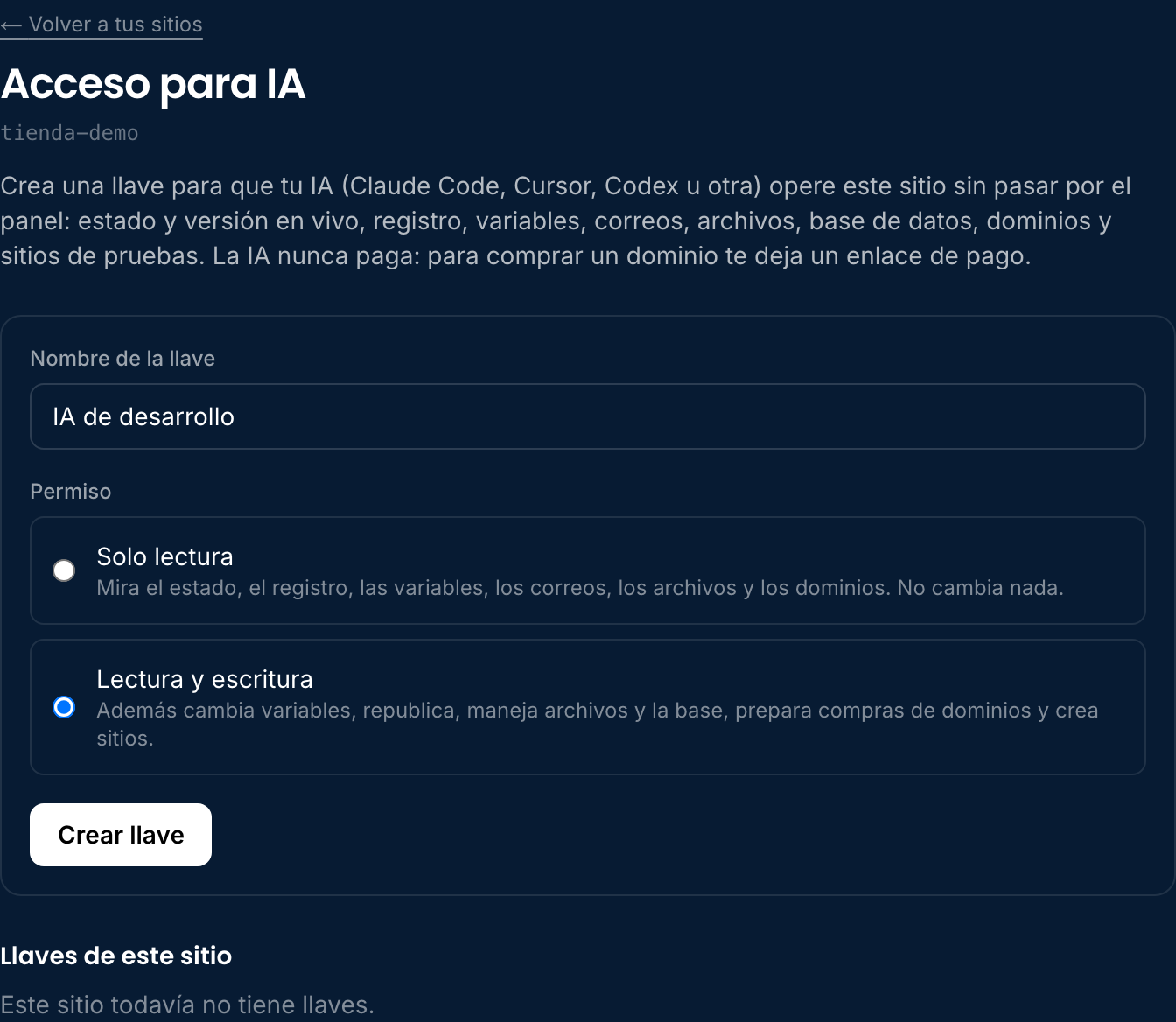
The site owner does this once. In the dashboard: YaDominios Cloud → site card → "Acceso para IA" (AI access).

They give it a recognizable name and pick the permission. For the AI to change things —variables, files, domains— it needs Read and write.
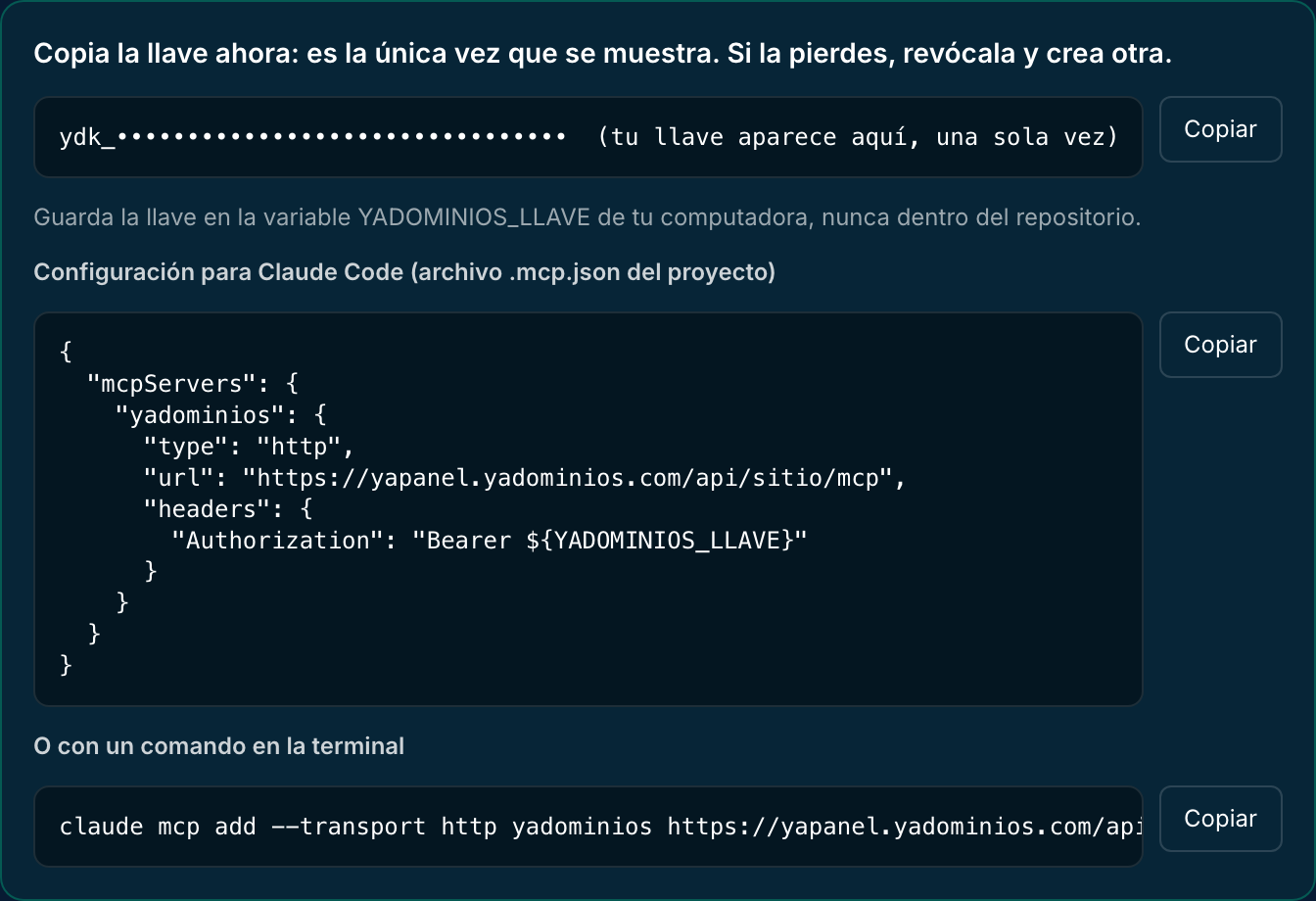
The key starts with ydk_ and is shown only once, with the configuration ready to copy.
2. Store it in an environment variable
On the machine where the AI works, in a variable named YADOMINIOS_LLAVE. Never inside the repository or any file that gets pushed.
export YADOMINIOS_LLAVE="ydk_…"3. Connect the tool and check
Pick your tool below. To check, call estado_del_sitio: it should return the site's name and the key's permission.
Connect your tool
Claude Code
In the .mcp.json file at the project root:
{
  "mcpServers": {
    "yadominios": {
      "type": "http",
      "url": "https://yapanel.yadominios.com/api/sitio/mcp",
      "headers": { "Authorization": "Bearer ${YADOMINIOS_LLAVE}" }
    }
  }
}
Or with a command:
claude mcp add --transport http yadominios https://yapanel.yadominios.com/api/sitio/mcp --header "Authorization: Bearer $YADOMINIOS_LLAVE"Cursor
In the project's .cursor/mcp.json (or ~/.cursor/mcp.json for all projects). Cursor reads variables with ${env:…}:
{
  "mcpServers": {
    "yadominios": {
      "url": "https://yapanel.yadominios.com/api/sitio/mcp",
      "headers": { "Authorization": "Bearer ${env:YADOMINIOS_LLAVE}" }
    }
  }
}
OpenAI Codex
In ~/.codex/config.toml. Codex sends the key in the Authorization header from the variable you name:
[mcp_servers.yadominios]
url = "https://yapanel.yadominios.com/api/sitio/mcp"
bearer_token_env_var = "YADOMINIOS_LLAVE"
ChatGPT on the web
Not today: ChatGPT's web connectors ask for an OAuth sign-in, and this server works with a key. Use Codex, Claude Code, or Cursor, or the HTTP API from any agent that can make requests.
Any agent that can make HTTP requests
curl -s https://yapanel.yadominios.com/api/sitio/v1 \
  -H "Authorization: Bearer $YADOMINIOS_LLAVE"
// JavaScript
const r = await fetch("https://yapanel.yadominios.com/api/sitio/v1/estado_del_sitio", {
method: "POST",
headers: { Authorization: "Bearer " + process.env.YADOMINIOS_LLAVE },
});
const { ok, resultado, error, mensaje } = await r.json();# Python
import os, requests
r = requests.post(
"https://yapanel.yadominios.com/api/sitio/v1/buscar_dominio",
headers={"Authorization": f"Bearer {os.environ['YADOMINIOS_LLAVE']}"},
json={"dominio": "mybrand.com"},
)
print(r.json())How the API responds
GET /api/sitio/v1 lists the tools your key can use. Each tool is called with POST /api/sitio/v1/<name>, with its arguments as a JSON body (or no body if it takes none).
// success
{ "ok": true, "resultado": { … } }
// failure
{ "ok": false, "error": "solo_lectura", "mensaje": "…" }
Over MCP they're the same tools, with the same names and arguments. A tool failure comes back inside the result, with isError: true and the same code, so the AI can read it and correct course.
The tools
| Tool | Permission | Arguments | What it does |
|---|---|---|---|
estado_del_sitio | read | — | Name, domains, plan, repository and branch, live version vs. branch version, and minutes behind. |
leer_registro | read | limite (1–200) | Latest events: publishes, errors, and notices. |
listar_variables | read | — | Environment variables. Secrets come back with valor: null. |
guardar_variable | write | clave, valor, secreto | Creates or replaces a variable. Applies on republish. |
borrar_variable | write | clave | Deletes a variable. Applies on republish. |
republicar | write | — | Publishes again from the connected branch. |
leer_correos | read | limite | Sent emails with status (sent, bounced, failed) and error. |
activar_correos_del_dominio | write | dominio | Turns on sending for a domain connected to the site and sets up its DNS. |
listar_archivos | read | cursor | Files in storage (env.BUCKET), 500 at a time. |
subir_archivo | write | clave, contenido_base64, tipo | Uploads or replaces a file. Up to 10 MB. |
borrar_archivo | write | clave | Deletes a file. Deleting what isn't there is not an error. |
consultar_base | write | sql, params | SQL on the site's database (env.DB), with ? parameters passed separately. |
mis_dominios | read | — | The account's domains: status, expiry, and whether they're on this site. |
buscar_dominio | read | dominio | Whether it's available and its one-year price. |
comprar_dominio | write | dominio, titular | Prepares the purchase and returns the payment link. The AI never pays. |
conectar_dominio | write | dominio | Connects a domain or a subdomain to this site. A subdomain is written into its domain's zone without touching the main domain or its email; if the domain is at another provider, returns the nameservers. |
crear_sitio | write | nombre, repositorio, rama | Creates another site on the same account and plan, with its own database and storage. |
Recipes
Register a domain and put it on the site
The AI never pays. It prepares the purchase, hands the link to the owner, and once payment lands the domain registers on its own.
POST /api/sitio/v1/buscar_dominio   { "dominio": "mybrand.com" }
→ { "ok": true, "resultado": { "dominio": "mybrand.com", "disponible": true, "precio": 14, "moneda": "USD" } }

POST /api/sitio/v1/comprar_dominio  { "dominio": "mybrand.com" }
→ { "ok": true, "resultado": { "precio": 14, "enlace_de_pago": "https://…", "aviso": "…" } }

// the owner opens the link and pays; then:
POST /api/sitio/v1/mis_dominios
→ [ { "dominio": "mybrand.com", "estado": "activo", "vence": "2027-10-11", "conectado_a_este_sitio": false } ]

POST /api/sitio/v1/conectar_dominio { "dominio": "mybrand.com" }
→ { "ok": true, "resultado": { "listo_sin_hacer_nada": true } }
If the account has no registrant record, send titular with nombre, apellido, telefono (with country code, e.g. +13055550100), direccion, ciudad, region, codigoPostal, and pais (two letters, e.g. US). This data is published in the domain's registration record: it must be the owner's.
Set an API key and apply it
POST /api/sitio/v1/guardar_variable { "clave": "PAYMENTS_KEY", "valor": "…", "secreto": true }
POST /api/sitio/v1/republicar
POST /api/sitio/v1/estado_del_sitio   // check the live version and al_dia
Create a test site
The branch has to exist in the repository first (for example, the one your test Action publishes).
POST /api/sitio/v1/crear_sitio { "nombre": "mystore-test", "repositorio": "https://github.com/you/your-repo", "rama": "yapanel-pruebas" }
→ { "ok": true, "resultado": { "url": "https://mystore-test.sitios.dev" } }
The new site has its own database and storage. To run it, the owner creates a key on THAT site: each key opens only one.
A test site on a subdomain
The usual setup for a test environment: staging.mybrand.com pointing at the test site, with mybrand.com untouched in production. Do it with the test site's key:
POST /api/sitio/v1/conectar_dominio { "dominio": "staging.mybrand.com" }
→ { "ok": true, "resultado": { "listo_sin_hacer_nada": true, "que_falta": "Nada: ya quedó apuntado." } }
Only the staging record is written inside the mybrand.com zone: the main domain, its site, and its email records are not touched. HTTPS is already covered by the domain's certificate. It works when the main domain belongs to the same account, registered here or connected to one of its sites; otherwise it answers dominio_ajeno.
Turn on the domain's email
POST /api/sitio/v1/activar_correos_del_dominio { "dominio": "mybrand.com" }Then send with the site's email API (see the guide on email from your domain).
Errors
| HTTP | Code | Meaning | What you do |
|---|---|---|---|
| 401 | sin_llave | No key arrived | Send it in Authorization: Bearer ydk_… |
| 401 | llave_invalida | That key doesn't exist | Check it's complete |
| 401 | llave_revocada | The owner revoked it; the message says when | Ask for a new one. Don't retry |
| 403 | solo_lectura | The tool changes things | It needs a write key |
| 403 | dominio_ajeno | That domain isn't on this site | Use a domain connected to the site |
| 404 | herramienta_desconocida | No such tool | List tools with GET /api/sitio/v1 |
| 409 | no_disponible | The domain is taken | Search for another |
| 409 | tope_de_sitios | The plan allows no more sites | The owner upgrades |
| 409 | sin_repositorio | The site isn't connected to a repository | Connect it in the dashboard |
| 400 | faltan_datos_titular | Registrant record missing | Send titular with comprar_dominio |
| 400 | subdominio_no_soportado | It's a subdomain and its main domain isn't on YaDominios | Connect the main domain to any of the sites first |
| 429 | demasiadas_llamadas | Over 120 calls in a minute | Wait a minute |
Security
- A key opens one site only, never the whole account. The site comes from the key: you can't ask for another.
- We only keep the key's fingerprint. If it's lost, it can't be recovered: revoke it and create another.
- Never in the repository or any pushed file. Always in an environment variable.
- Everything the AI changes is logged in the site's log with the key's name.
- The AI can't pay for anything:
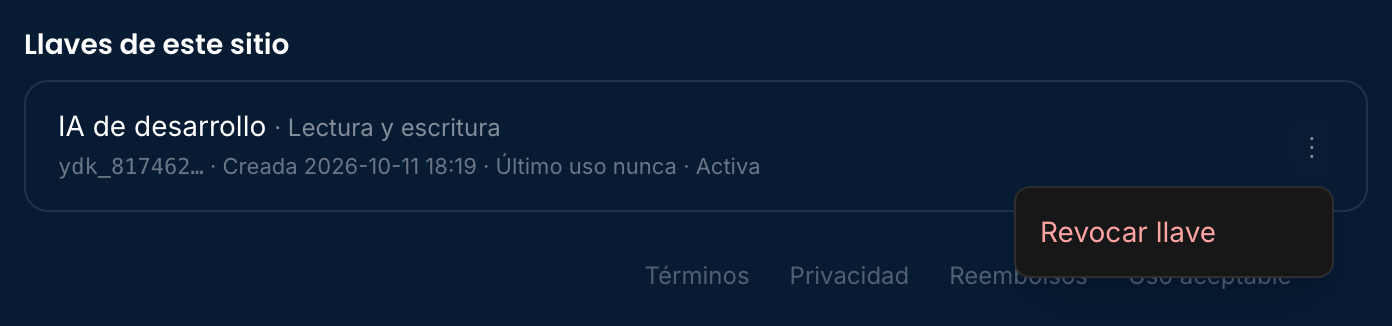
comprar_dominioreturns a link, and a person pays. - If it leaks, the owner revokes it from the key's three-dot menu. It stops working that same instant.
Instructions for the AI reading this
Run the site with the "yadominios" MCP server or the API at https://yapanel.yadominios.com/api/sitio/v1.
1. Always start with estado_del_sitio: it tells you which site this is and your key's permission.
2. The key is in the YADOMINIOS_LLAVE variable. Never write it to a file, a commit, or a message.
3. Before changing anything (variables, files, database, domains), tell the owner what you're about to do.
4. After saving or deleting variables, call republicar and check with estado_del_sitio.
5. For a domain: buscar_dominio → comprar_dominio → give the enlace_de_pago to the owner → wait until it shows as activo in mis_dominios → conectar_dominio.
6. If you get llave_revocada, stop and ask for a new key. If you get demasiadas_llamadas, wait a minute.
Frequently asked questions
Does it work with ChatGPT?
With OpenAI Codex, yes, using the key in config.toml. ChatGPT's web connectors require OAuth, which we don't offer today; for ChatGPT use Codex or the HTTP API.
Can the AI buy a domain on its own?
No. It can search and prepare the purchase, but what it returns is a payment link for the owner. The domain registers itself once the person pays.
Does the key expire?
No. A key that expires in the middle of a job is a silent failure. It lasts until the owner revokes it.
Does it work for several sites?
No: one key, one site. If the AI runs two sites, create a key on each.
Do I also need the database token?
Not for this: consultar_base uses the write key. The database token keeps working the same for your code.
Can I give an advisor read-only access?
Yes. A read-only key sees status, log, variables, email, files, and domains, and changes nothing.